My Day
Where: Sales → My Day. It's the first row in the sidebar for a reason.
One screen answering one question: what do I actually do today? Tasks are split by urgency rather than dumped in a flat list, and the page ends with the deals that have no next step at all — which is where a pipeline quietly goes cold.
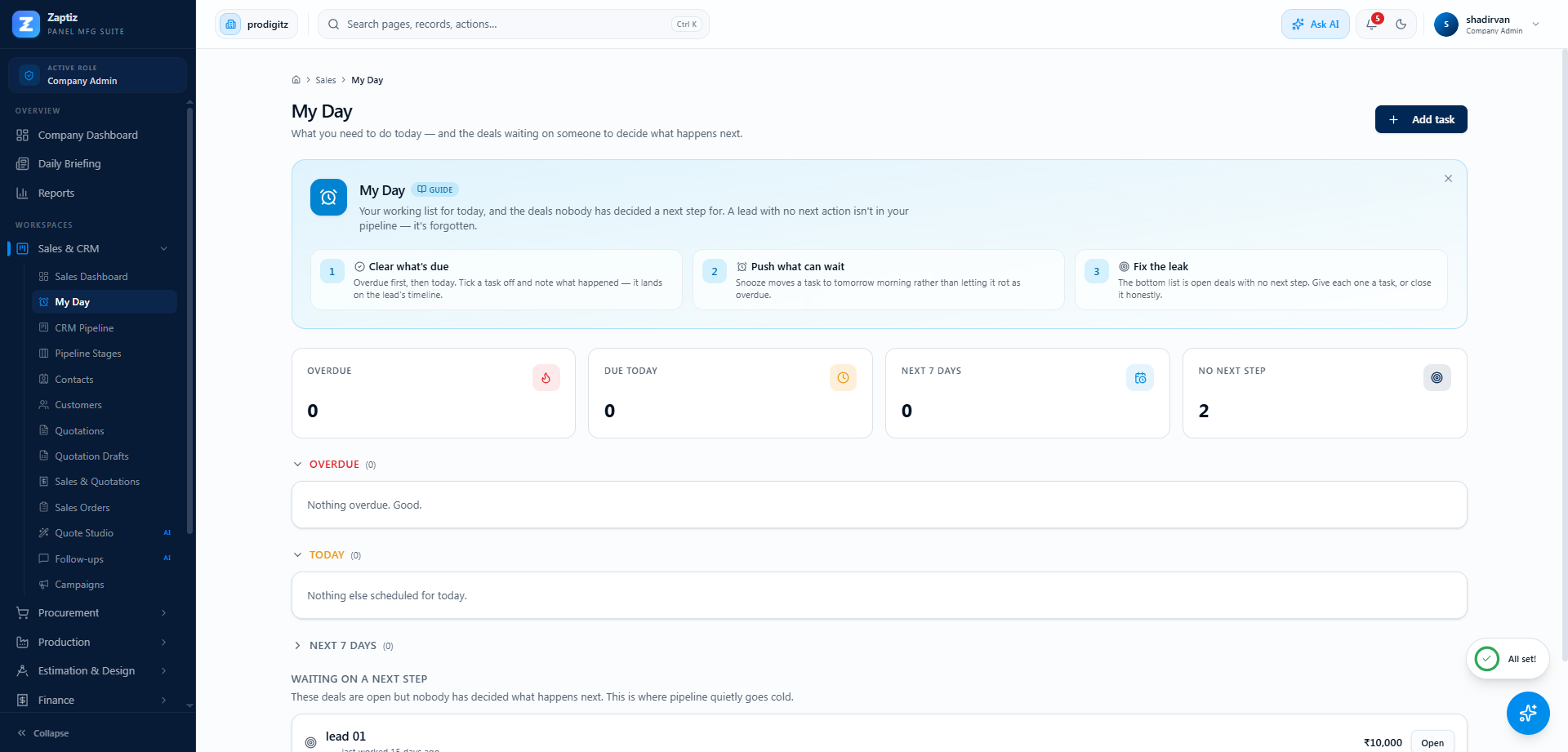
The four numbers at the top
| KPI | Means |
|---|---|
| Overdue | Due before now and still not done. Clear these first. |
| Due today | Scheduled for the rest of today. |
| Next 7 days | This week's commitments — collapsed by default so it doesn't crowd today. |
| No next step | Open deals with nothing scheduled against them. Not a task count — a warning. |
Your tasks
Tasks appear in buckets — Overdue, Today, Next 7 days, and No date — each collapsible. Every row shows the task type icon (call, email, meeting, site visit, to-do), the time and a plain relative reminder ("3 days ago", "in 2 hr"), and the lead it belongs to as a link straight into that lead's workspace.
Two badges are worth knowing:
- HIGH / URGENT — the priority you set. Normal and Low aren't badged, so a badge always means something.
- AI — the task was created by an agent, not by a person.
Adding a task
Add task (top right) asks for what needs doing, a type, a priority, a due date and optional notes.
A task with no due date never reaches your day — it lands in the collapsed No date bucket and stays there. The dialog says so, because "I'll do it sometime" is how tasks become archaeology.
Finishing a task
Click the circle to the left of any task. You're asked "What happened?" — and if the task is attached to a lead, your answer is written onto that lead's timeline. That is the whole point: the outcome of the call ends up on the deal, where the next person to open it will read it, instead of in your head.
The outcome is optional. Filling it in is what makes the timeline worth having.
Snoozing
Overdue tasks get an alarm-clock button that pushes them to 10:00 tomorrow. It's only offered on overdue tasks — snoozing something that isn't late yet is just editing the date.
Waiting on a next step
The section at the bottom of the page lists open deals with no scheduled task, oldest neglect first, with the value at stake and when it was last worked ("last worked 12 days ago", or "never worked").
This is the leak a task list normally hides: you can clear every task on your list and still be ignoring half your pipeline. Open one, do something, and log it — a note, a call, or a task with a date on it — and it drops off the list.
When there's nothing here you get "Every one of your open deals has a next step scheduled." That is the actual goal of the page.
How this fits with the agents
- The Follow-up Agent chases cold leads by email. My Day is for what you do; the agent handles what can be automated. A lead can appear in both.
- Agent-created tasks are badged AI and behave like any other task — you can complete, snooze or ignore them.
- Logging any activity on a lead marks it warm again, which affects both this page and the follow-up agent's judgement.
Tips
- Work top to bottom. The buckets are already in the right order.
- Write the outcome even when it's "no answer, trying Thursday" — that's the note that stops a colleague repeating the call.
- If No next step is consistently above zero, your problem isn't task management, it's that deals are entering the pipeline faster than anyone can work them.